
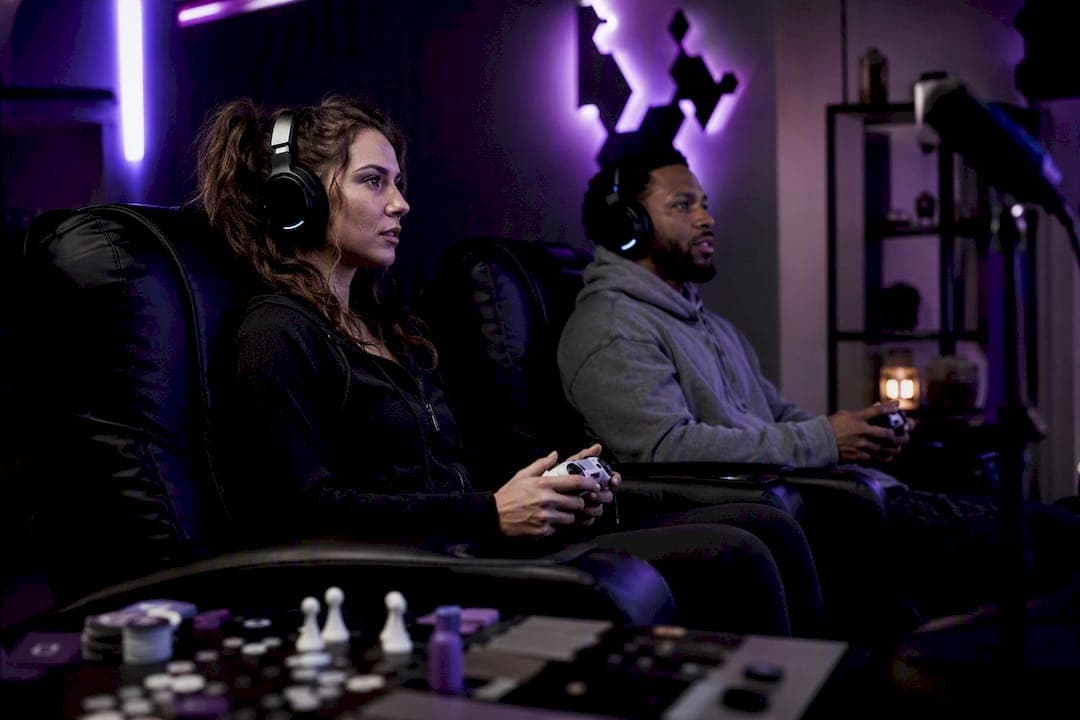
The fastest way to make gamer friends online is to combine targeted discovery (platforms that match by game, schedule, or vibe) with a short outreach playbook: a clear profile, a friendly first message, and one scheduled session together. Skip the vague "add me" energy. Specificity gets replies.
Here's the three-step version you can run in the next 15 minutes:
- Join one discovery hub built around your main game or platform, whether that's a Discord LFG server, a Steam group, or a gamer-focused app like Midnight Lobby.
- Update a single profile field, availability or platform, since half-finished profiles get skipped fastest.
- Send one simple message or LFG post inviting someone to a one-session hangout, no long-term commitment required.
That's it. Everything below expands on why these three moves work and how to do each one well, whether you're grinding ranked on Steam, hosting co-op nights, or lurking in Twitch chat waiting for the nerve to say something.
Key Takeaways
The most reliable way to make gamer friends online combines targeted discovery, a specific outreach message, and one low-pressure first session, repeated consistently.
| Point | Details |
|---|---|
| Match discovery to your style | Use Discord and LFG hubs for speed, Reddit and forums for slower, stickier connections. |
| Specificity beats generic outreach | LFG posts with game, time, role, and tone get far more replies than vague "add me" messages. |
| Profile fields drive first impressions | Linked platforms, availability, and a one-line playstyle summary matter more than stats. |
| Move slowly from public to private | Verify accounts, use platform moderation tools, and delay sharing personal details. |
| Consistency builds real friendships | Weekly recurring sessions and shared goals convert one-off teammates into a lasting squad. |
| Midnight Lobby lowers first-message friction | DuoFit matching and in-chat Duo Breakers help gamers connect without the usual awkward opener. |
Table of Contents
- Where Can You Find Gamer Friends Online?
- How Do You Start a Conversation and Set Up Your First Session?
- What Should Your Gaming Profile Include?
- Is It Safe to Meet Gamers Online?
- How Do You Turn a Teammate Into an Actual Friend?
- Which App Features Actually Help You Find Gaming Friends?
- How Midnight Lobby Helps You Break the Ice With Other Gamers
- Ready to Try a Single App Instead of Five Different Communities?
- Frequently Asked Questions
- Sources
Where Can You Find Gamer Friends Online?
Not every platform serves the same purpose, and picking the wrong one for your personality type is the number one reason people give up after a week. Some are built for instant matchmaking. Others reward patience and community involvement.
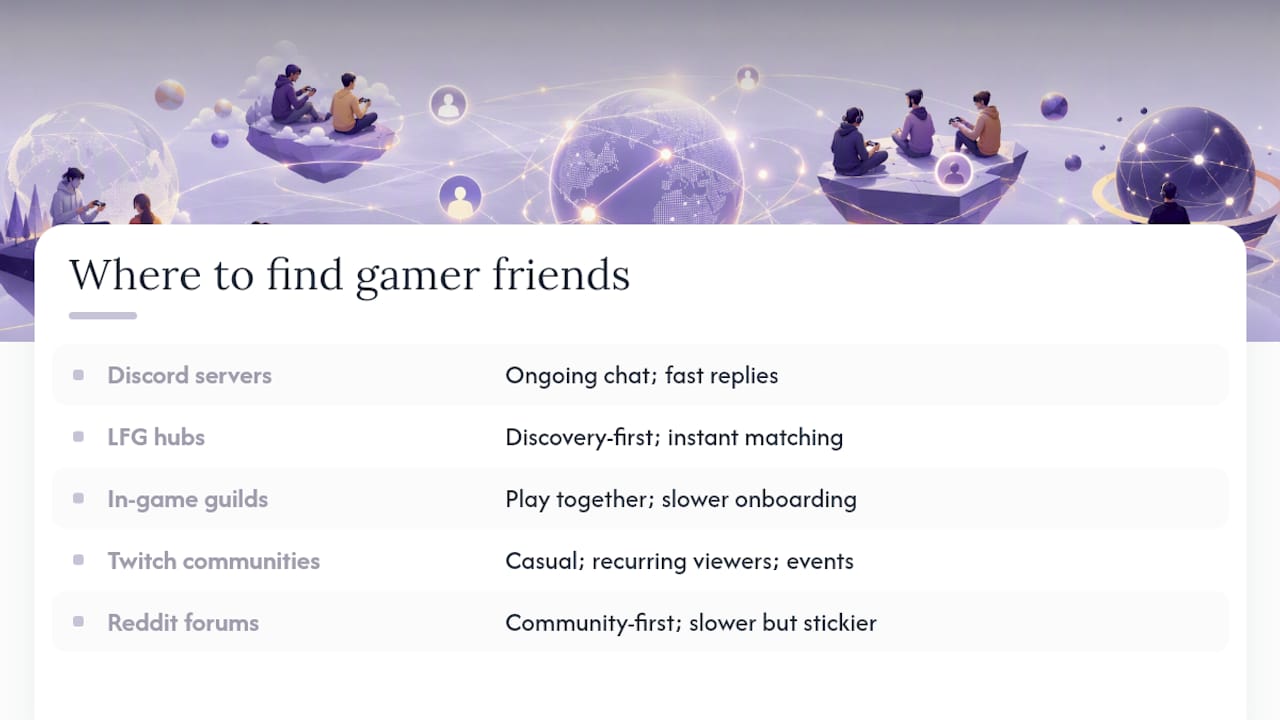
Discord servers and community hubs work best if you want ongoing conversation, not just a single session. Most active servers have dedicated LFG channels, voice-first culture, and enough member volume that posting during peak hours gets a response within minutes. Look for servers with visible moderation, pinned rules, and channels that separate casual chat from LFG requests. A server with 50,000 members and a dead LFG channel is worse than one with 2,000 active daily posters.
LFG hubs and matchmaker apps exist specifically to skip the small talk. Apps like GameTree run AI matchmaking through a Discord bot, and services like Pairup offer no-signup lobbies with built-in mini-games. These are discovery-first: you're not building a friendship yet, you're finding out fast whether someone's schedule and energy match yours.
In-game clans and guilds remain one of the most durable ways to make gaming friends because you're already doing the activity together. MMO guilds, competitive shooter clans, and co-op raid groups create structure without you having to initiate much. The tradeoff is slower onboarding. You often need to apply or prove some baseline skill first.
Twitch communities and streamer chat work surprisingly well for casual connection. Watching the same creator's channel regularly and participating in chat during community game nights puts you in front of the same familiar names night after night, and streamer-hosted LFG events turn strangers into teammates fast.
Reddit subreddits and game-specific forums (communities like GamerPals) are community-first rather than instant. You post once, get a handful of responses over days, and build from there. Slower, but the connections tend to stick because people self-select for genuine interest rather than convenience.
Platform groups like Steam Groups and Xbox Clubs sit somewhere in between: low effort to join, moderate response speed, and useful mainly as a supplement to more active channels.
Quick signals worth checking before you invest time in any community: active member count relative to total size, visible moderation, and whether LFG posting has its own channel or gets buried in general chat.
How Do You Start a Conversation and Set Up Your First Session?
Most people stall here, not because they can't find gamers, but because they don't know what to say once they do. Here's the sequence that actually converts strangers into a playable group.
- Write a targeted LFG post first. Include the game, the time window, the role or archetype you need, and a one-line tone signal. "Looking for a chill support duo, Overwatch 2, weeknights around 8 PM EST, no mic pressure" gets far more replies than "LF friends to play with."
- Send a DM that matches the room's energy. A cold "hey" gets ignored. A specific opener doesn't.
- Confirm logistics before you commit to a time. Ask about voice preference, platform, and rough skill level in one short follow-up message so nobody wastes 20 minutes matchmaking the wrong lobby.
- Run one short session, then follow up within 24 hours. A quick "that was fun, same time next week?" is how a one-off becomes a standing plan.
Three DM openers depending on who you're messaging:
- Casual player: "Saw your post, I'm mostly here for fun runs and bad jokes, not tryhard energy. Down for a game tonight?"
- Competitive player: "You mentioned climbing ranked, I'm around the same rank and free most evenings. Want to duo queue this week?"
- Cooperative/co-op player: "I'm putting together a small group for weekly co-op runs, low pressure, just consistency. Interested?"
Pro Tip: Keep the first session under 90 minutes and set one small, shared goal, like clearing a single mission or hitting a few wins. Open-ended "let's just play and see" sessions tend to fizzle because nobody knows when it's socially fine to log off.
What Should Your Gaming Profile Include?
Your profile does the talking before you do, and vague ones get scrolled past. Prioritize these fields, in order of impact:
- Linked platforms (Steam, Xbox Live, PlayStation Network, Nintendo) so people can verify you're a real player, not a bot account.
- Current top games, not your all-time favorites from three years ago. Recency signals actual availability.
- Specific timezone and availability window, not just "evenings," which means something different in every timezone.
- Voice or chat preference, stated plainly, since mismatched communication styles kill more matches than mismatched skill levels.
- A one-line playstyle summary, like "chill co-op" or "tryhard duo," that tells someone exactly what energy to expect.
A screenshot from a recent session or a short bio line does more work than a stat-heavy brag list. Stats tell someone how good you are; a vibe line tells them whether they'd actually enjoy playing with you, which is the thing that determines whether a friendship forms at all.
Two mistakes to avoid: listing "flexible" as your availability (it tells people nothing) and leading with rank or KDA instead of playstyle, which reads as a filter for competitiveness rather than an invitation to connect.
Is It Safe to Meet Gamers Online?
Meeting strangers online carries real risk, and a little caution up front saves a lot of hassle later. The core rule: move slowly from public chat to private voice, and never let someone rush that timeline.
Practical safety habits worth building into your routine:
- Keep personal details (full name, address, workplace, school) out of your profile and out of early conversations.
- Use each platform's built-in moderation and reporting tools rather than trying to handle harassment yourself.
- Try a short, time-limited voice channel for a first call instead of committing to hours-long sessions with someone new.
- Favor profiles and communities that link verified platform accounts, since fake or empty accounts are a common scam vector.
Red flags to watch for: someone pushing to move off-platform to texting or a different app within minutes of meeting, anyone asking for money or gift cards, and profiles with vague or constantly shifting availability that never quite lines up with a real session.
Pro Tip: Use a separate gamer handle that isn't tied to your real name or main social accounts, and hold off on sharing those social profiles until you've actually played together a few times. Trust gets built through consistency, not through how fast someone asks for your Instagram.
How Do You Turn a Teammate Into an Actual Friend?
One good session doesn't make a friendship. Consistency does. The gamers who end up with a real friend group almost always did the same handful of things on repeat.
- Schedule something recurring, even if it's just a weekly hour-long slot. A standing appointment beats a vague "we should play sometime again."
- Set a shared goal that gives you a reason to keep showing up: a weekly co-op night, a challenge run, a shared achievement grind, or a small community tournament.
- Create a group channel once you've got three or more regulars, so plans stop happening one-on-one through scattered DMs.
- Set expectations early, including how often you'll actually play and an easy, no-guilt way for anyone to skip a week without it feeling like a breakup.
Shared goals do more bonding work than raw hours spent playing. A group grinding toward the same raid clear or speedrun personal best has a built-in reason to check in between sessions, which is usually the moment a gaming acquaintance turns into an actual friend.
Which App Features Actually Help You Find Gaming Friends?
Not every feature marketed by matchmaking apps earns its place. Some sound impressive and add almost nothing to whether you actually end up with a friend.
Worth prioritizing when you're evaluating any app or community:
- Library or game linking, so matches are grounded in games you actually own and play.
- Schedule and availability filters, since mismatched playtime windows cause more wasted outreach than mismatched skill.
- Playstyle or personality indicators, which tell you more about compatibility than a rank number ever will.
- Temporary voice channels for a low-stakes trial run before committing to a longer session.
- Moderation and reporting tools, plus some form of account verification.
What's overrated: pure skill or rank-based matching with no schedule filter attached. Two great players with opposite time zones and opposite senses of humor still won't become friends. The combination that actually converts is a shared library match plus availability filters plus a low-friction first activity, whether that's a quick match or a built-in icebreaker mini-game.
Quick evaluation checklist before you commit time to a new app: does it link real platform accounts, does it let you filter by schedule, and does it give you something low-pressure to do together before you're expected to carry a full conversation?
How Midnight Lobby Helps You Break the Ice With Other Gamers
If juggling five different Discord servers and LFG apps sounds exhausting, Midnight Lobby approaches the same problem from a different angle: matching people by gaming lifestyle first, then giving them something to do together immediately.
The DuoFit compatibility system pairs users based on similar gaming habits and preferences, so you're not sorting through profiles that share nothing but a platform in common. Instead of guessing whether someone's actually a co-op night person or a competitive grinder, DuoFit surfaces that upfront.
The bigger friction-killer is Duo Breakers, in-chat mini-games like Draw & Guess and Hangman built directly into conversations. Icebreaker games like these lower the pressure of a first message because you're playing something small together instead of staring at a blank chat box trying to think of an opener. That mechanic exists because guided mini-games measurably increase reply rates on first contact, which tracks with how much easier it is to talk to someone once you've already done something together.
Profiles are gaming-centric by design, surfacing platforms, crossplay availability, and playstyle instead of the usual dating-app small talk. Getting started takes three steps: download the app, complete your DuoFit profile, and try a Duo Breaker with your first match instead of typing "hey" and hoping for the best.
Why Small, Consistent Steps Win
Nothing here is complicated. What separates people who build a real gamer friend group from people who bounce between five servers and never stick is repetition: one scheduled session a week, one short follow-up message, one profile that actually says something specific about who you are. Pick a single action from the plan above and do it today. Momentum matters more than any single platform choice.
Ready to Try a Single App Instead of Five Different Communities?
If you'd rather not juggle a Discord server, an LFG app, and a Reddit thread just to find one decent teammate, Midnight Lobby gives you one place that matches on gaming compatibility and hands you a built-in conversation starter instead of a blank chat box.
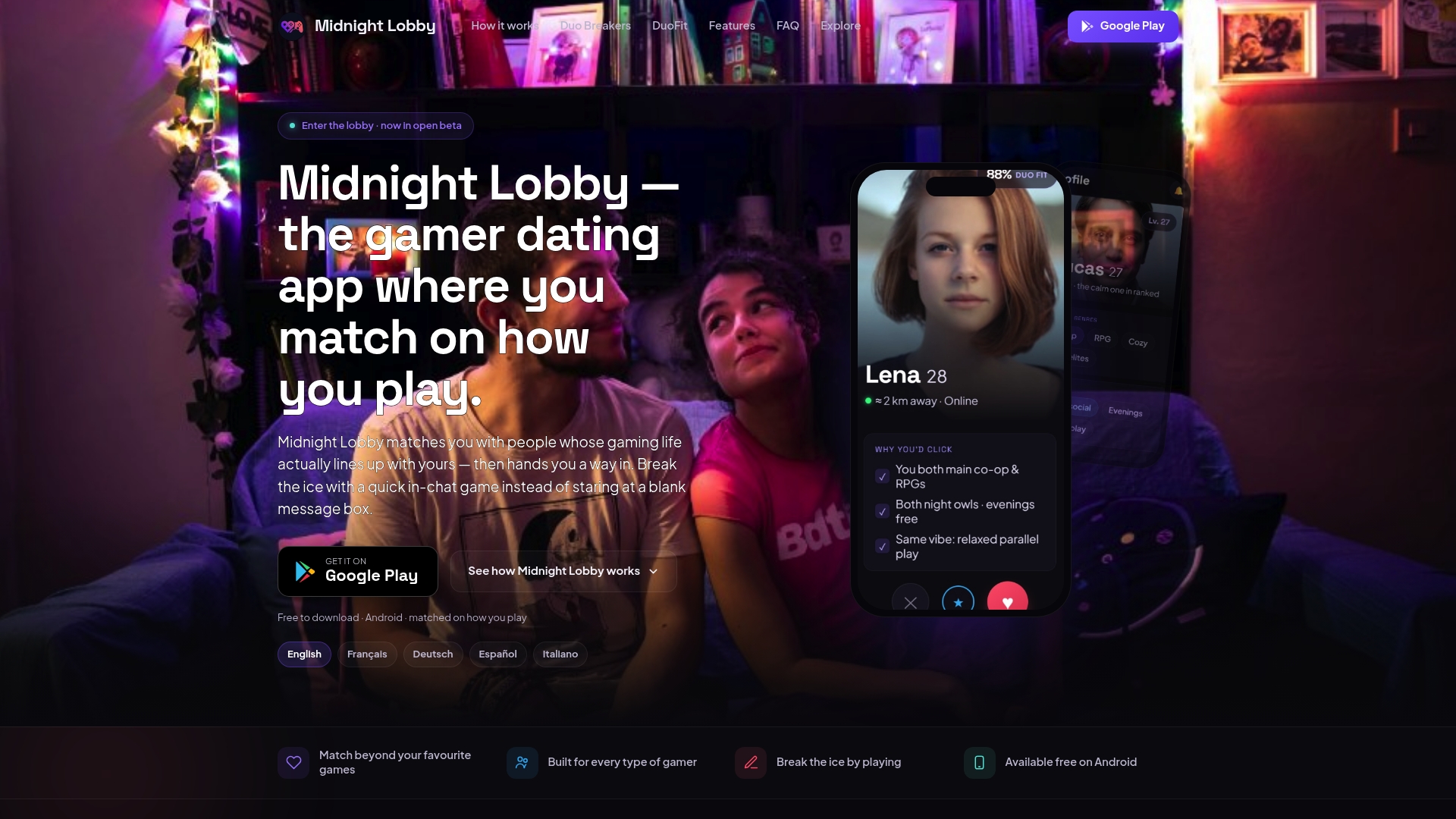
The DuoFit system does the filtering work that usually takes weeks of trial-and-error DMs, matching you with people whose habits and preferences already line up with yours. And because every match comes with Duo Breakers built in, you're never stuck staring at an empty message field trying to write the perfect opener. The app is a free download on Android, so there's no cost barrier to testing it out.
Getting started takes three steps: download the app, fill out your gaming profile and DuoFit preferences, and open a Duo Breaker with your first match instead of typing "hey." If you want a fuller picture of how the matching logic works before diving in, the gamer dating guide walks through it in more detail.
Frequently Asked Questions
How do I get online gaming friends if I'm starting from zero? Pick one game you play regularly, join its Discord server or subreddit, and post a specific LFG message with your availability and playstyle. One good post usually beats scrolling ten servers passively.
Is there a "Tinder for gamers"? Yes, several apps match gamers by shared games, schedule, or lifestyle rather than swiping on looks alone. Midnight Lobby is built specifically around gaming compatibility, using DuoFit matching and in-chat icebreaker games instead of a generic swipe deck.
What's the "20 second rule" for making friends in gaming communities? It's informal social guidance suggesting you respond to a message or LFG post within roughly 20 to 40 seconds of seeing it when you're actively online, since quick replies keep momentum and signal you're genuinely available right now, not just browsing.
Which games are easiest for meeting compatible people? Cooperative games with clear roles (raid-based MMOs, co-op shooters, party games) tend to build friendships faster than purely competitive ones, since shared objectives force communication and turn strangers into a working team quickly.
How do I balance making gaming friends with the rest of my life? Set a fixed weekly time block instead of playing on-demand whenever someone messages. A predictable schedule protects your time and actually makes you a more reliable, more attractive teammate to others.
Sources
- Twitch channel example (lets_playsum)